Downloads
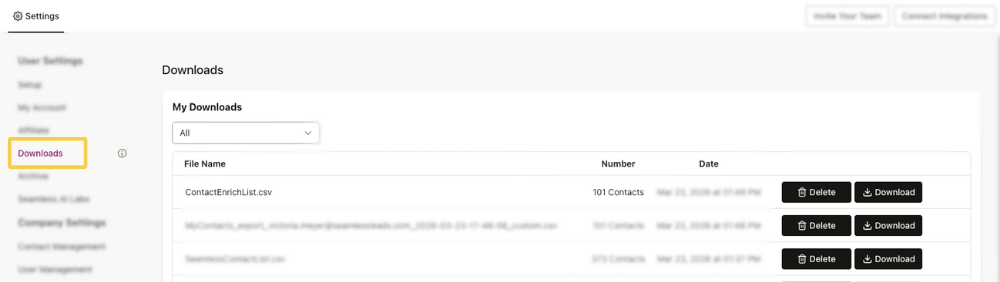
Downloads tab is a dedicated section that keeps a record of all completed downloads.
Downloading to a CSV File
You can download contacts or companies from Seamless individually or in bulk from My Contacts and My Companies, including filtered, selected, or full lists. Downloads can be customized using Clean, Raw, or Custom file types so you can export the data that best fits your workflow.
For full step-by-step instructions on filtering records, choosing download options, and recommended export fields, see the Downloading a CSV article.
View Previous Downloads
Users can access and view previously downloaded Contacts and Companies downloads from the Downloads page in account settings.
This page will display essential information about each download, such as the file name, number of contacts/companies in that file, date and time of completion, and the option to re-download or delete.
This page serves as a convenient repository where users can easily access and manage files they have previously downloaded. Users can utilize this tab to track, organize, and quickly locate their downloaded files. You have the option to filter between contact and company downloads!